Feeder Generator
The feeder generator module, gld_residential_feeder.py, takes a model [feeder].glm (GridLAB-D readable format), identifies existing transformers on the feeder with downstream load, determines how many houses each transformer can support based on the average house load in kVA, and adds that many houses and small ZIPloads. This module also adds commercial buildings and ZIP loads based on identified commercial loads. The newly populated feeder is saved as a separate .glm, which can be used for subsequent analysis in GridLAB-D.
The gld_feeder_generator.py is an updated feeder generator that combines
the functionality of the residential_feeder_glm.py, the commercial_feeder_glm.py,
and the copperplate_feeder_glm.py.
Before proceeding, please be sure you have successfully installed TESP.
Quick Run
To quickly generate a feeder from the default taxonomy feeder, simply run the following command from the tesp directory. This will read in the default configuration file (feeder_config.json5), which specifies the default taxonomy feeder, user-defined feeder attributes, and required metadata files, and then generate a populated feeder based on that information.:
python3 tesp/design/feeder_generator/gld_residential_feeder.py
This will result in a populated feeder model named “test.glm” unless otherwise specified, in the same directory as the input feeder. The console will also print out the number of houses, commercial buildings, and DERs added to the feeder.
Understanding and Customizing the Feeder Generator
The feeder generator relies on seven classes: Config, Residential_Build, Commercial_Build, Battery, Solar, Electric_Vehicle, and Feeder, each of which are detailed below.
Config
The Config class reads in the required user-defined configuration and metadata and makes them available to the other classes in the script.
Feeder Configuration
The feeder_config.json5 file contains the required configurations read in by the Config class and used by the rest of gld_residential_feeder.py. This config file is organized into the following sections for readability and ease of use.
Simulation Config: the basic information to run a simulation, including start and stop times, timesteps, time zone, and the interval for the metrics collector.
Input and Outupt Files: file names of the input
[feeder].glm, a name for the output[populated_feeder].glm, case (folder) name, substation name, and the names of the required residential, commercial, battery, and electric vehicle metadata files obtained in the pre-req.Note: this section is where you define the feeder model that you wish to populate. If using your own feeder, rather than one of PNNL’s taxonomy feeders (see
tesp\data\feedersfor available .glm files), the file path to your feeder must be specified with ``in_file_glm``. If empty, a taxonomy feeder is used.RECS (Residential Energy Consumption Survey) Data: required RECS metadata files and/or the parameters required to generate the RECS metadata using
recs_gld_house_parameters.py. If these files do not yet exist, leave “recs_metadata_file” empty and specify the parameters in the “recs_parameters” section, which will call onrecs_gld_house_parameters.pyto generate the required metadata file.Climate/Location: the location of the feeder and appropriate weather file for the simulation.
Residential & Commercial Population: desired characteristics of the populated feeder, including the average size of a residential and commercial building (in kVA), and the mix of customer classes along the feeder.
Distributed Energy Resources: specifies whether DERs are populated on the feeder according to RECS income and building type distribution data, or according to user-defined distribution.
Solar Diction: parameters defining the solar panels added to houses on the feeder, including panel type, efficiency, and tilt angle.
Simulation (continued): additional parameters required to run the simulation that the user is less likely to modify, such as the random number seed, included schedule files, sets, defines, etc.
Residential Population Definition
The 2020 Residential Energy Consumption Survey data are the foundation of how TESP creates a realistic distribution of residential housing stock on the feeder. The recs_gld_house_parameters.py script responsible for creating the residential metadata file RECS_residential_metadata.json fetches this metadata based on state, housing_density, and income_level.
Consider the following test case, in which those parameters are::
"state": "VT"
"housing_density": ['No_DSO_Type']
"income_level": ['Low', 'Middle', 'Upper']
This information is used by the generate_recs function to assign the default commercial, residential, battery, solar, and ev metadata if that RECS metadata file does not already exist as specified in the configuration file. RECS data exists at state-level granularity.
Residential_Build
The primary function of this class is to add_houses to the feeder. The dependent functions of add_houses are also contained in this class, such as those required to set the thermal properties, heating and cooling setpoints, and income level of the houses, based on RECS and Config. This class is also responsible for adding small ZIP loads to the houses.
Commercial_Build
The primary function of this class is to scan loads assigned with a ‘C’ class by the buildingTypeLabel function within the Residential_Build class and replace those with commercial building loads. Those identified commercial loads are then used to define and add commercial zones, buildings, and ZIP loads. If the feeder does not contain loads with the parameter load_class or if none are type ‘C’, no commercial loads will be added to the feeder.
Battery
The primary function of this class is to define the battery and inverter objects to add to the houses via the add_batt function.
Solar
The primary function of this class is to define the solar and inverter objects to add to the houses via the add_solar function.
Electric_Vehicle
The primary function of this class is to define the EV chargers to be added to the feeder as well as their corresponding vehicle’s driving and charging behavior. This is achieved by first reading available driving data from the NHTS survey via processs_nhts_data and matching that data with a realistic driving schedule via match_driving_schedule based on the daily miles driven, work departure, and work arrival times. This class contains an additional check to ensure that the driving schedules have realistic timings, via is_drive_time_valid.
Feeder
This class pulls everything together to read the input feeder (readBackboneModel) and populate it with the residential, commercial, battery, solar, and electric vehicle charging loads defined in the previous classes. This is primarily achieved via the GLMModifier() module, called with the shorthand self.glm throughout. Existing transformer configurations are modified to accomodate the new loads and then the feeder is populated. This is achieved via the functions identify_xfmr_houses and identify_commercial_loads which report the number of houses, small loads, and commercial feeders to be added by the rest of the module.
Populating your Feeder Model
To run the feeder generator, the Config class must first be initialized with the user-defined config file, after which Feeder reads that config, as such.:
def _test1():
config = Config("./feeder_config.json5")
feeder = Feeder(config, "full")


if __name__ == "__main__":
    _test1()
feeder_demo.py in tesp\examples\capbilities\feeder-generator will do this for you using the default feeder_config.json5, which will output a populated feeder called test.glm.
The Feeder class has two options, “full”, or “copperplate”, specifying whether to populate a full-order feeder with both residential and commercial buildings, or a simplified copperplate feeder model that has limited commercial buildings.
Below is a sample output to console from running feeder_demo.py or similar.:
User feeder not defined, using taxonomy feeder R1-12.47-2.glm
Average House size: 4.5 kVA
Results in a populated feeder with:
    4 small loads totaling 8.90 kVA
    247 houses added to 247 transformers
    157 single family homes, 82 apartments, and 8 mobile homes
Average Commercial Building size: 30.0 kVA
Results in a populated feeder with:
    84 commercial loads identified, 13 buildings added, approximately 3600 kVA still to be assigned.
    3 med/small offices with 3 floors, 5 zones each: 45 total office zones
    0 warehouses,
    2 big box retail with 6 zones each: 12 total big box zones
    0 strip malls,
    0 strip malls,
    1 education,
    2 food service,
    1 food sales,
    0 lodging,
    0 healthcare,
    2 low occupancy,
    2 low occupancy,
    2 streetlights
DER added: 13 PV with combined capacity of 67.9 kW; 4 batteries with combined capacity of 54.7 kWh; and 4 EV chargers
Visualizing the Results
An example test case with the user-defined IEEE-123.glm test feeder will yield the following graph.
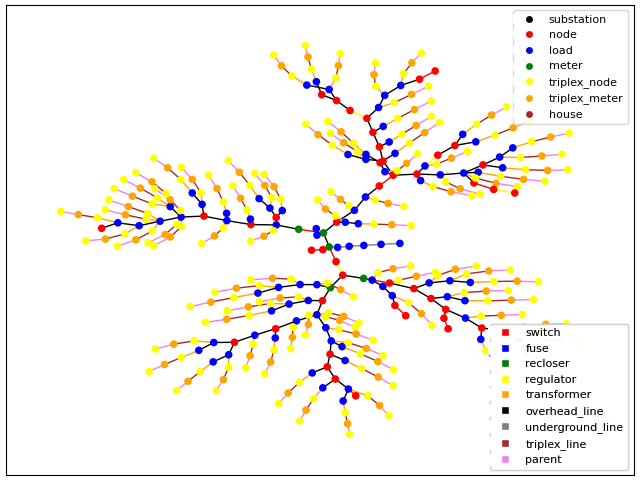
Figure 1. Unpopulated IEEE-123 Test Feeder
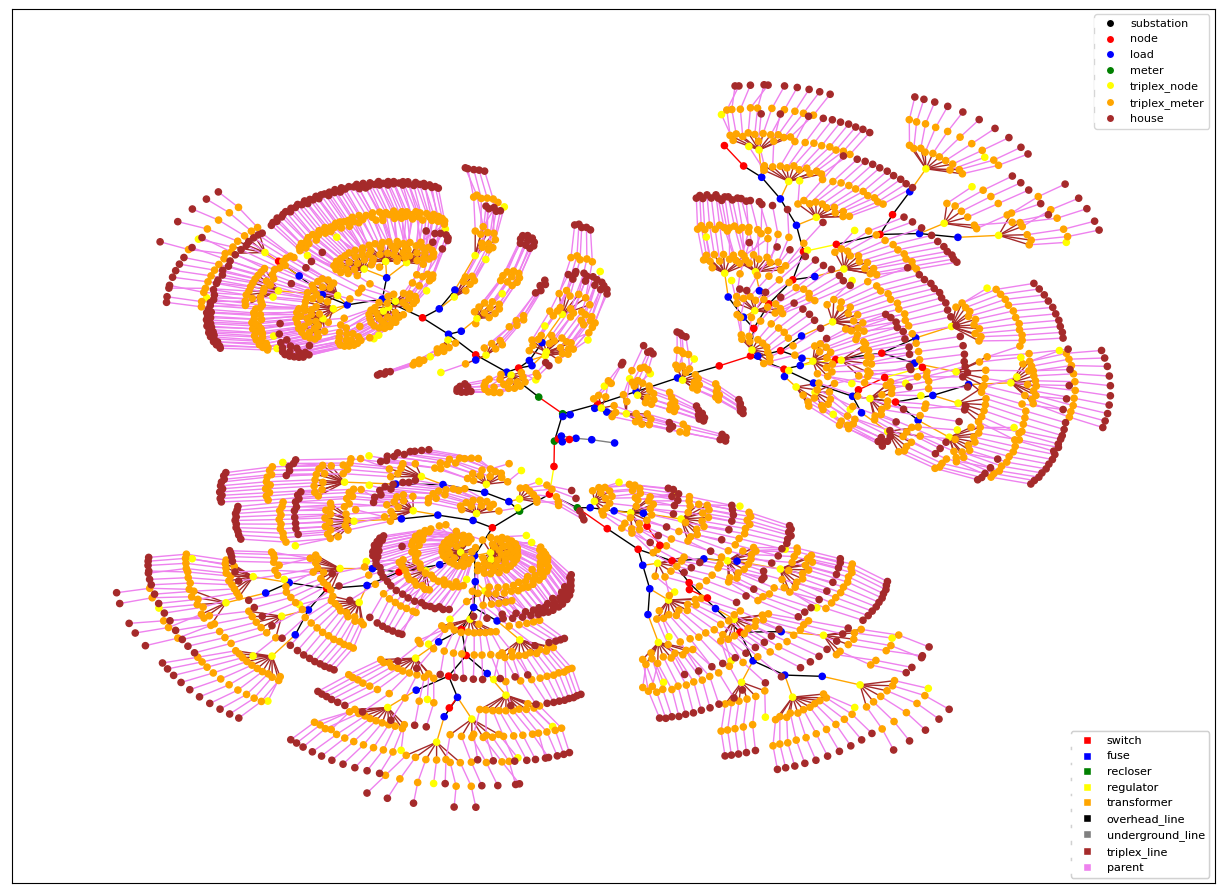
Figure 2. Populated IEEE-123 Test Feeder using gld_feeder_generator API